UNI-QUAD UQ-1A
QUADRAPHONIC DECODER
 The page author took the idea for the Dynaquad device, and expanded it into an adjustable
decoder. It can decode any of the regular matrix formats. The following are instructions
on how to build and use this decoder. The instructions for use are placed first.
The page author took the idea for the Dynaquad device, and expanded it into an adjustable
decoder. It can decode any of the regular matrix formats. The following are instructions
on how to build and use this decoder. The instructions for use are placed first.
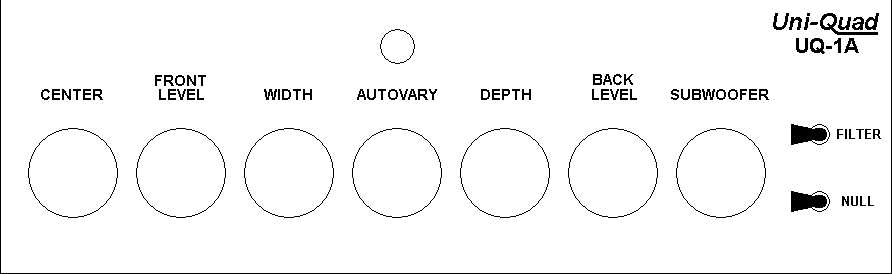
SAMPLE FRONT PANEL OF UQ-1A
USING THE DECODER
Calibration
Before the UQ-1A decoder can be used, it must be calibrated. To calibrate the decoder,
follow the following steps:
- Choose a monaural audio source (or select MONO on the amplifier, if possible).
- Turn down (counterclockwise) the FRONT LEVEL, CENTER, and SUBWOOFER controls.
- Play the source.
- Move the NULL switch to the NULL position.
- Adjust the amplifier's BALANCE control.
- Move the NULL switch away from the NULL position. The NULL position is used only for
calibration.
Using the Decoder
Use the following table to adjust the decoder.
- 0 % = full anticlockwise
- 100% = full clockwise.
- The exact positions depend on the particular manufacture of the controls.
| MATRIX | WIDTH | DEPTH | FILTER | AUTOVARY |
OTHER INSTRUCTIONS |
| Sansui QS | 60 % | 60 % | OFF | As desired | - |
| Dynaquad | 100 % | 40 % | OFF | As desired | - |
| EV Stereo-4 | 80 % | 90 % | OFF | As desired | - |
| Dolby Surround | 90 % | 100 % | ON | As desired |
Back speakers farther away, louder than front |
| Synthesized Quad | 70 % | 60 % | OFF | As desired | - |
| Concert Hall | 60 % | 90 % | Try each | As desired | - |
| Stage Surround | 60 % | 30 % | OFF | 0 % | - |
| Noisy Lateral Records | 0 % | Turn down | ON | 0 % | - |
| Vertical Recordings | Turn down | 100 % | ON | 0 % |
Turn down center and subwoofer |
Using Autovary
The decoder is equipped with Autovary separation enhancement logic. Autovary must be
adjusted for each matrix according to the following instructions:
- Play the program source.
- Turn the Autovary control to 0 %.
- Adjust the Depth control to the widest the back channel separation desired.
- For most matrix systems, use the setting in the table above, or use a lower setting.
- For the EV matrix, use 60 %.
- For Dolby Surround, use 60 to 80 %.
- Adjust the Autovary control so the light is flashing when front-center program material is
present.
- If more enhancement is desired, increase the Autovary setting.
- If the image seems to shift abruptly, reduce the Autovary control setting.
- To turn off Autovary separation enhancement, turn the control to 0 %.
TECHNICAL DETAILS
How the decoder works
The decoder works in the following way:
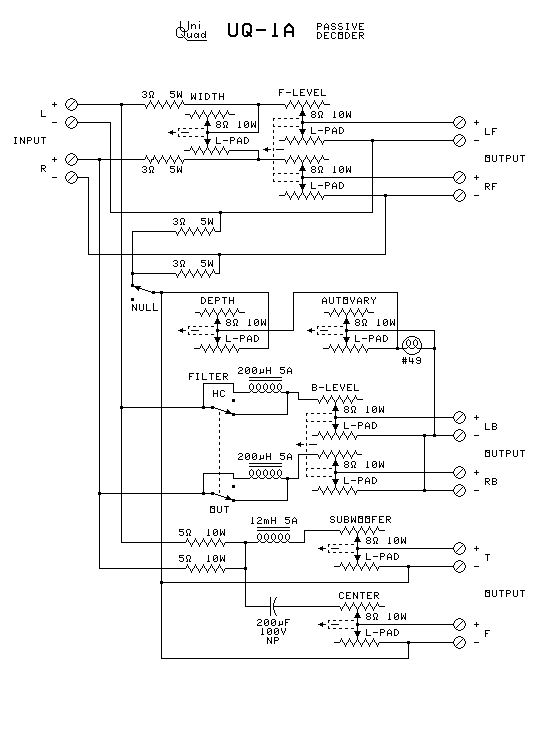
- The front left-to-right separation is reduced by the Width control according to its
setting. The control provides a blending between the left front and the right front
speakers that reduces as the Width control is turned toward 100 %. The 3-ohm resistors
keep the Width control from affecting the other channels.
- The amount of blend in the front speakers is a tradeoff between higher front
left-to-right separation at low blend, and higher front-to-back separation at maximum
blend. Most matrix systems are based on this tradeoff.
- The back left-to-right separation is reduced by the Depth control according to its
setting. The control provides an antiblending between the left back and the right back
speakers that increases as the Depth control is turned toward 100 %. The 3-ohm resistors
prevent damage if the amp does not have common grounding. The Depth control resistance
causes part of the signal sent to one back speaker to go through the other back speaker
in reversed polarity.
- The amount of antiblend in the back speakers is a tradeoff between higher back
left-to-right separation at low antiblend, and higher front-to-back separation at maximum
antiblend. Most matrix systems are also based on this tradeoff.
- The center speaker and the subwoofer are fed from the 5-ohm resistors. A crossover
network determines what sound goes to the center speaker and what sound goes to the
subwoofer.
- The Null switch disconnects the Depth control from the back speakers. This makes the
back speakers reproduce only the difference between the incoming left and right stereo
channels. Adjusting the Balance control on the amplifier for minimum sound from a mono
source removes any imbalance.
- The Autovary separation enhancer uses the nonlinear resistance characteristics of
the lightbulb to change the amount of antiblend on the back speakers. When the bulb is
not lit, its resistance is lower, so it increases the back left-to-right separation, while
reducing the front-to-back separation. When strong center front material is present, the
increased current through the bulb causes it to light up. This causes the resistance of
the bulb to increase. This increases the amount of antiblend, increasing the front-to back
separation, while reducing the left-to-right back separation. This keeps the center
soloist out of the back speakers.
- The filter switch in the filter position rolls off all signals above 7 KHz in the back
channels. This removes noises in the back channels, and creates the back signal for Dolby
Surround.
How the matrix systems work
The matrix systems are designed in the following ways:
- The Sansui QS matrix is designed for equal separation between speakers all around the
room.
- The Dynaquad matrix was designed to maximize front left-to-right separation, at the
expense of front-to-back separation and back left-to-right separation.
- The EV Stereo-4 matrix was designed to favor front left-to-right separation and
front-to-back separation, at the expense of back left-to-right separation. It is best for
recording classical music with concert hall ambiance.
- Dolby Surround is designed with full front separation and no back separation.
- The Hall setting is designed to maximize front-to-back separation (for recordings with
concert hall ambiance) while sacrificing some front left-to-right separation and almost all
back left-to-right separation.
- The CBS SQ matrix, Denon BMX matrix, and several other phase shift matrix systems are
designed with modulations beyond the capabilities of this decoder.
Building the decoder:
Use the schematic diagram to wire the decoder.
The design shown is good for up to a 40-watt amplifier (20 watts per channel)
 Parts list:
- A case to hold the parts
- Two stereo L-pads*
- Two mono L-pads*
- Either three mono L-pads* or three log-taper 50-ohm 10-watt rheostats*
- One double-pole double-throw toggle switch
- One single-pole single-throw toggle switch
- One #49 miniature lamp***
- One panel mount miniature bayonet lamp socket
- Four 3-ohm 10 Watt resistors*
- Two 5-ohm 10 Watt resistors*
- Two 200-microhenry 5-amp inductors* **
- One 12-millihenry 5-amp inductor* **
- One 200-microfarad 100 volt non-polarized capacitor* **
- Solder-lug terminal strips for making connections
- Four 4-gang screw to solder pin terminal strips for the back panel
- Knobs for the controls (may be supplied with the L-pads)
- Materials to label the panels
*These parts need to be higher wattages, amperages, and voltages for higher power systems.
See below.
**Double the capacitances and halve the inductances if the speakers are 4 ohm.
***Select the lamp according to your amplifier wattage. See below.
If no subwoofer is designed into the system, replace the capacitor with a wire.
Construction:
- Make sure there is room between the front and back panels for the stereo L-pads, the
terminal strips, and the resistors.
- Drill the holes and mount the parts on the front and back panels.
- Mount the terminal strips and connect the resistors, coils, and capacitor to them.
- Parts that are connected together can share the same terminal.
- Wire the decoder according to the circuit diagram at right.
- If high amplifier power is used, provide enough ventilation for cooling.
Connections:
- Connect the amplifier to the input terminals as indicated. Be sure to observe polarity.
- The speakers used should be nominally 8 ohms.
- Connect the left and right front speakers to the indicated terminals. Be sure to observe
polarity.
- Connect the left and right back speakers to the indicated terminals. Be sure to observe
polarity.
- If a center speaker is used, connect it to the center speaker terminals.
- If no center speaker is used, turn the center speaker control to 100 %.
- If a subwoofer is used, connect it to the subwoofer speaker terminals.
- If no subwoofer is used, turn the subwoofer control to 100 %.
For Higher Wattage Amplifiers:
- The parts marked 5 watt should be 1/4 the power output of one channel or higher.
- The parts marked 10 watt should be 1/2 the power output of one channel or higher.
- The parts marked 5 amp can stand most power levels - the specification was to prevent
using coils with fine wire.
- The capacitor must be a nonpolarized one.
- The nominal voltage of the lightbulb must be at least a fifth of the max power output
voltage.
- Multiply the channel power output in watts by the nominal speaker
impedance in ohms.
- Take the square root of the above product to get the max useful power
output voltage.
- Divide the max power output voltage by 5 to get the optimum lightbulb
voltage.
- You want a small instrument panel light, not a large illumination
lamp.
- The hot resistance should be between 25 and 35 ohms.
- If the amplifier burns out the bulb, get a bulb with a higher voltage.
- Sample light bulb values.
| BULB | VOLTS | AMPS | WATTS | HOT OHMS |
COLD OHMS | MAX AMPLIFIER WATTS/CHANNEL |
| #49 | 2 V | .06 A | .12 W | 33 | 3.3 | 20 W |
| #44 | 6.3 V | .25 A | .1.6 W | 25 | 2.5 | 120 W |
| #51 | 7.5V | ..22 A | 1.65 W | 34 | 3.4 | 175 W |
LINKS: